
FlexSim2016 flowchart modeling Simulation: Process Flow
The new FlexSim 2016 makes flowchart modeling simulation really easy
[original blog created by FlexSim’s Markus Cueva – April 2016]
Why you can save hours on your projects with FlexSim 2016
Recently I got to witness a modeling miracle. Like most of our past training courses, the instructor (in this case FlexSim’s training manager Regan Blackett) sat down with one of the attendees to build a model he wanted to start working on. It was a manufacturing system with a few unique elements, including components shared between different facilities. The training attendee assumed it would take a few days to have a working version of the model — 90 minutes later, and thanks mostly to a brand new tool, a sizeable portion was already finished.
“We were able to think much more abstractly from the beginning,” Regan recalled. “It let us turn a rudimentary process into a working model in a much shorter amount of time.”
Sample Process Flow picking model:
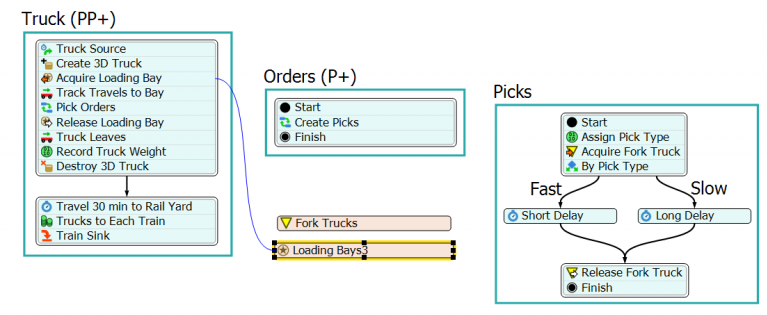
Picking orders made easy thanks to Process Flow.
Back in October at the FlexSimposium, we unveiled an innovative and revolutionary way to define logic in a 3D simulation model. This tool, called Process Flow, has since become a rock star around FlexSim headquarters. It’s made an appearance in nearly every consulting project we’ve done since its earliest beta release. It’s easily punched out picking operations, crushed call centers, and put a licking on logistical systems.
And now, with the launch of FlexSim 2016 last month, it’s ready and waiting to take your simulation experience to the next level. But can Process Flow really cut down hours from a typical simulation project? Yes, it can — and here’s how:
1. Process Flow makes it easier to model complex systems
Anyone who has ever done a big simulation project will tell you that accurately modeling the logic of a system is the most time-consuming part. FlexSim is armed with picklist options and event triggers to ease this burden, but many models still require a large amount of customization to make them accurate. Customization like this can often lead to lines upon lines of computer code. Process Flow tackles this problem in two ways:
- It replaces nearly all computer code with a flowchart. That’s right, the same sort of flowcharting method that thousands of businesses rely on each day for successful projects. Using a wide array of pre-built activity blocks, you build the logic as you build out a flowchart of the system.
- It allows you to stay organized. Most of us don’t think in code, but we can certainly track the steps in a process or procedure. Process Flow gives you the ability to organize your logic in a way that works best for you.
2. Process Flow lets your project scale as you need it to
It’s difficult (or even impossible) to know what shape a model might take where you’re in the early stages of an improvement project. At LM Wind Power, factory management will have regular brainstorming sessions to discuss dozens of possible ideas to better their operation. Their Director of Manufacturing 2.0 Implementation, Michael Belote, explained that it’s tough to determine which ideas should be prioritized — and it’s impractical to find out by building a full simulation at this early phase. It would be nice to have a solution that could fill that gap.
“Process Flow gives you an option that is really practical and real-world, especially in factories,” Michael says. “You have the ability to get a very quick and rough, high-level idea of which brainstormed idea will provide the best output — then you can do detailed models in a much more focused way.”
The best part: you can just expand your existing model in Process Flow to become that detailed model. Each process in your system can be adjusted with more or less detail to best fit the project demands, and there is no extra work needed to backtrack. Just take a simple brainstorm model, flesh out a few of the finer details, and you’re already well on your way to finishing the model.
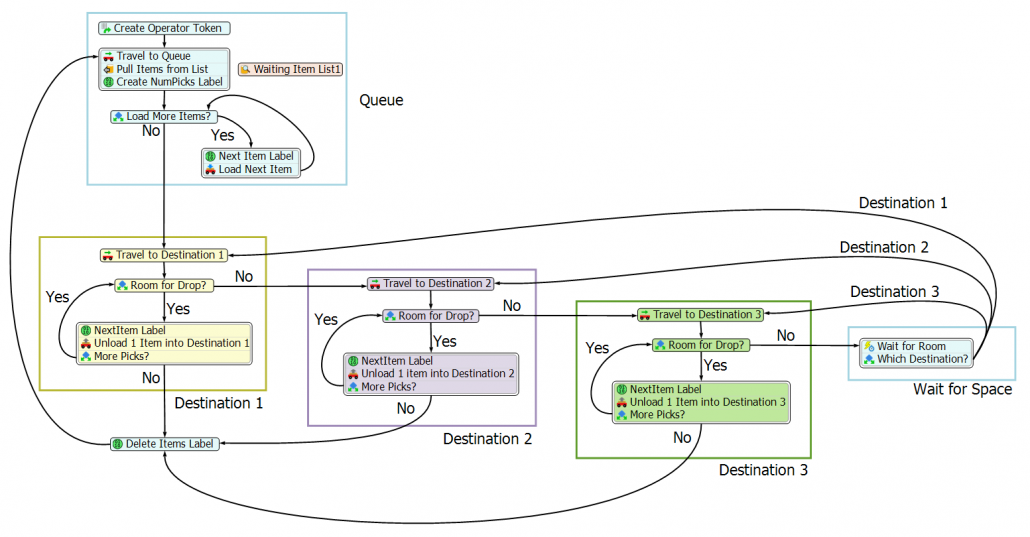
3. Process Flow keeps the logic in one central location
Dustin Derrick, a consultant at FlexSim, tells a story about a massive, beautiful system logistics model that took him nearly a week to debug. The model’s logic was spread across dozens of queues and processors. It was an enormous task just to track down why an operator was appearing somewhere he wasn’t supposed to be.
This could have been avoided if the logic was easier to find. In Process Flow, that’s exactly what you’ll get — a central location for the logic in your model. You can still use the best aspects of our powerful standard object library, but now your customized logic can be easily created and discovered in one convenient window. Debugging is also easier than ever. As you simulate, tokens will move through your system and show you exactly what activities they are on if something goes awry.
What about that enormous system logistics model? Dustin estimates the same debugging task would have taken him less than an hour if it were built using Process Flow. The only way to know how much time you will save is to give it a try. Sign up now to download FlexSim’s free evaluation version or download FlexSim here.